Which estimating method fits a one-person trade?
Short answer: paper pads work until you need to find what you charged last time; spreadsheets work until a customer wants to sign on site or the quote has to become an invoice; an estimate app earns its place when you quote more than a handful of jobs a month, reuse pricing, and want to see margin before you send. Full accounting software is the right pick when you have staff and a bookkeeper. Click through:
Do you send more than four quotes a month?
Below that, the tool matters less than the habit.
Do customers ever ask for a change mid-job, or an invoice from the quote?
That is where paper gets retyped.
Do you price new jobs by remembering what a similar past job cost?
If yes, that memory is your most valuable business asset and it is in your head.
Do you have employees or a bookkeeper who needs the numbers?
Payroll and ledgers belong in accounting software, not an estimate app.
Do you want to see gross margin before the quote goes out?
Spreadsheets can do this if you build it; most people never do.
Do you quote on site, sometimes with no signal?
Cloud tools and shared spreadsheets go quiet in basements and barns.
Under four quotes a month, few changes, no invoicing from the quote: a numbered carbonless estimate pad is fine. The one habit: photograph every sent page so you can find last year's price. ScopeBid is not the answer here.
You quote regularly but only care about the customer price. A one-tab template with line items, tax and a PDF export covers it. Keep a second tab of past jobs by hand. If that tab ever gets painful, the next step is an estimate app.
Staff or a bookkeeper means the ledger is the centre of the business. Use the estimating module of whatever accounting package your bookkeeper already runs, so quotes, invoices and payroll live together. An estimate app would be a second system.
Few quotes, but changes and invoices happen. An app that turns an approved quote into an invoice without retyping saves the exact evening you lose today. ScopeBid's first three quotes are free with full PDFs, which may be all you need for a while.
At the desk with signal, a well-built spreadsheet can show margin. The app wins only if you want the last similar job's real cost next to the new quote, change orders with their own margin, and quote-to-invoice in one step.
Regular quoting, pricing from past jobs, margin before you send, on site without signal. That is the exact shape of ScopeBid: Business Memory, Profit Guard, offline PDFs, on-screen acceptance, quote to invoice. Try the three free quotes on your next real job before paying for anything.
What the app looks like, tinted so you look at the layout, not the colours
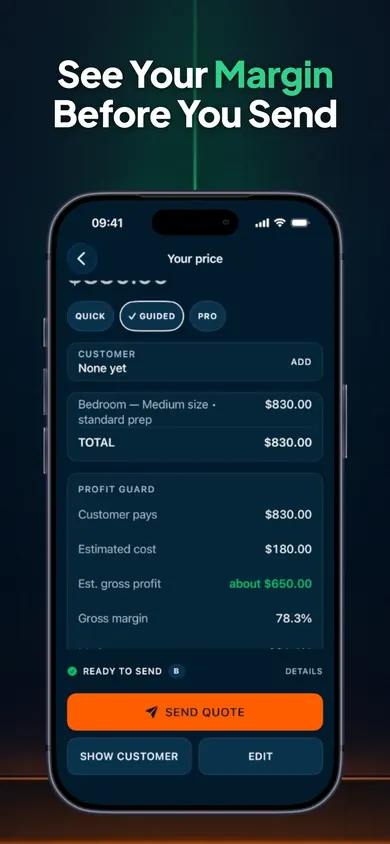
Profit Guard: customer price, direct cost, gross profit and margin, separated, before Send Quote.
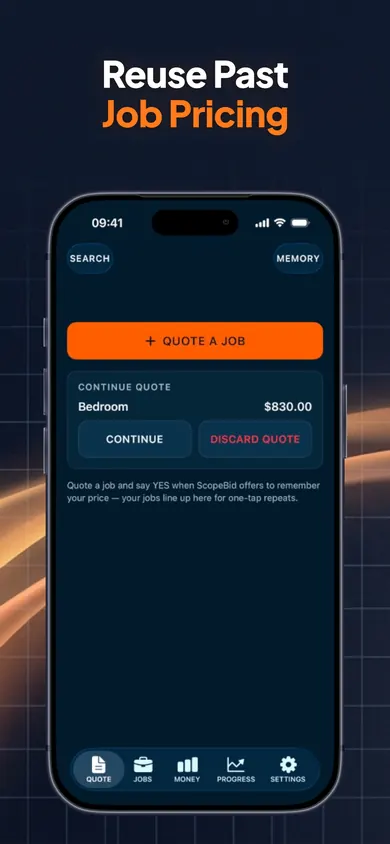
Business Memory: the last similar job, with its price, ready to reuse and adjust.
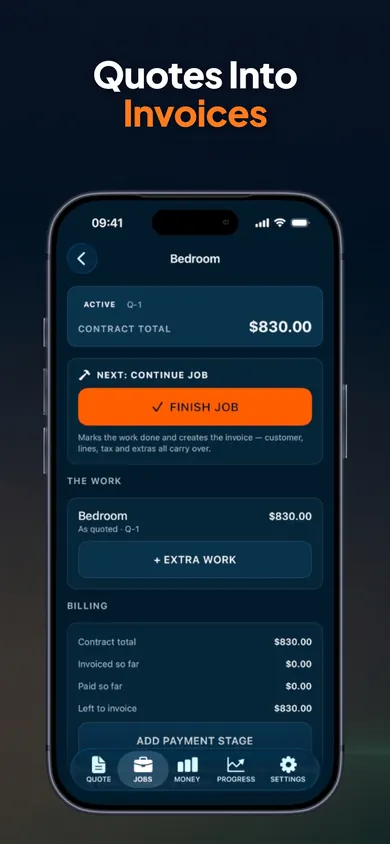
Approved quote to invoice, with extra work and payment stages, without retyping.
Paper vs spreadsheet vs app vs accounting software
| Need | Carbonless pad | Spreadsheet | ScopeBid | Accounting software |
|---|---|---|---|---|
| Find what you charged last time | Flip through copies | Second tab, if you keep it | Business Memory keeps every job with rates, hours, materials | Search past invoices |
| Margin before sending | Mental maths | If you build the formulas | Profit Guard shows price, cost, profit, margin, markup; tax never counted as profit | Usually after the fact |
| Customer signs on site | Pen | No | On-screen signature | Varies |
| Quote becomes invoice | Retype | Copy and edit | One step, with change orders | Yes |
| Works with no signal | Always | Local file yes; shared sheet no | Yes, no account, no cloud copy | Mostly cloud |
| Payroll, ledgers, tax filing | No | No | No, by design | Yes |
| Cost | A few dollars a pad | Free | 3 quotes free; Pro subscription for unlimited | Monthly subscription |
How a quote goes in ScopeBid
Reuse, then adjust
Start from a saved job, a trade template or blank. Price first (what the customer pays) or cost first (labour and materials, get a suggested price). Hourly, per-person, crew, per-unit and area line items.
Check profit, then send
Profit Guard shows the margin; an optional minimum-margin warning you can override. Clean PDF with your logo and terms; internal cost and margin never print on customer documents.
Complete, then learn
Turn the approved quote into an invoice, record deposits and partial payments, then a ten-second closeout of actual labour and materials feeds the next similar quote.
Honest limits
- It is not accounting software. No payroll, no ledger, no tax filing. You set your own tax rates and stay responsible for compliance.
- It does not take payments. It records them. Cards, e-transfers and cash happen wherever they happen today.
- Three free quotes, then Pro. Unlimited quoting, the full Business Memory, job costing and invoicing are in the subscription. Everything you make stays viewable and exportable either way.
- One phone, no cloud. No account and no cloud copy means your data is only on the iPhone until you export a backup. That is a privacy feature and a responsibility.
A made-up Tuesday, first year in business
Two bedrooms to quote after a full day. The pad is in the van, the last bedroom you did was in March, and you charged either 780 or 830. In the app, the March job is the first thing on the Memory screen: 830, standard prep, 4.5 hours, two cans. You tap Continue, change the ceiling height, watch the margin stay above 70%, and send the PDF from the driveway. The customer signs on your phone before you leave. Nothing is retyped on Friday.
Who should pick something else
Crews and companies
Once there is payroll, several people quoting, or a bookkeeper, a job-management or accounting platform is the centre and an estimate app becomes a second system.
Trades that bill hourly after the fact
If you rarely quote ahead and mostly invoice time, an invoicing-first tool fits better than an estimate-first one.
Anyone who needs online payment links
ScopeBid records payments; it does not collect them. If "pay now" buttons matter, look elsewhere.
Questions solo trades ask
Is a spreadsheet good enough for contractor estimates?
For a few jobs a month with stable pricing, yes, if you also keep a PDF export habit and never edit the sent copy. It breaks when you need the last similar job's real cost, when the customer wants to sign on site, or when the quote has to become an invoice without retyping.
What should every contractor estimate include?
Scope in plain words, line items with quantities and units, labour and materials separated, trip charge or minimum, tax shown separately, deposit and payment stages, a validity date, and your terms. The checklist at the top of this page is that list.
Does ScopeBid process payments?
No. It records deposits and partial payments received by cash, cheque, e-transfer, bank transfer or a card terminal and tracks the balance. It does not process cards or move money, and it is not accounting or tax software.
Is ScopeBid free?
The first three quotes are free with full PDFs, and everything you create stays viewable and exportable whether or not you subscribe. ScopeBid Pro, a monthly or annual subscription, adds unlimited quoting plus the full Business Memory, job-costing and invoicing workflow.
Does it work with no signal?
Yes. Quoting, PDFs, invoices and records work offline, there is no account, and there is no cloud copy of your business data. Back up from Settings when you want one.
Make it a habit with ScopeBid
First three quotes free with full PDFs. No account, works offline, margin before you send.
Sources
- ScopeBid: Estimate & Invoice, App Store listing, version 1.1.0, read 4 November 2026. Feature, pricing-structure and limitation statements come from this text.
- Columns for paper pads, spreadsheets and accounting software describe the general category, not a named product; check any specific product's own listing.