Which subscription trackers link to your bank, and which don't
Short answer: on the US App Store today, Rocket Money, Hiatus and Feenko read your bank transactions to find recurring charges. MoneyShield, Bobby, Subscription Manager, Subpilot and MonoBoost work from what you type in and never see an account. Everything below comes from each app's own listing text on 4 November 2026; we only quote prices that appear in that text.
| App | Bank link? | How subscriptions get in | Reminders | Cancel help | Price (per listing) |
|---|---|---|---|---|---|
| MoneyShield: Sub TrackerHonest Little Apps · ours | No | You add each one: name, price, cycle, next charge | Same day to 30 days ahead; trial, cancel-by and follow-up reminders | Shows the official cancellation route, checklist, request templates, record of the outcome | Free. Plus $3.99/mo, $24.99/yr or $59.99 once (listing, US) |
| BobbyYummygum | No | Pick from hundreds of presets or add custom | Notifies when a bill is due | Not described in listing | Free download; paid options not stated in listing text |
| Subscription Manager - BillsKango Studios | No | Manual entry with categories, currencies, notes | Opt-in reminders before due dates | Not described in listing | Free download |
| SubpilotLinerios | No | Add unlimited subscriptions manually | Listing focuses on totals and analytics | Step-by-step cancellation guides for 500+ services | Free download |
| MonoBoostMnboost Corp | No | Manual overview of active services and renewals | Renewal visibility per listing | Listing mentions cancelling from the overview | Free download; listing mentions a premium tier |
| Rocket MoneyRocket Money | Yes, bank login | Connects to your accounts and finds recurring charges | Bill and renewal alerts | Can cancel subscriptions and negotiate bills for you | Free features plus a paid Premium tier (listing) |
| HiatusHiatus Inc. | Yes, bank login | Monitors your linked accounts | Flags rate increases and bills | Money-saving tools per listing | Free download |
| FeenkoGotYourBack Technologies | Yes, bank login | Scans bank transactions to detect subscriptions | Spending overview and alerts | Cancel or manage from the app with guidance | Free download; listing quotes $9.99/week for the paid plan |
MoneyShield is our app, so read that row with that in mind. Rating counts and star averages are left out on purpose: our app is new and has almost none, and the others' are not what this page is about.
Who should pick a subscription tracker that doesn't link to your bank, and who shouldn't
If you want privacy, no login and deadlines a bank feed cannot see, a manual tracker fits. Two cases where MoneyShield is the wrong pick:
You want charges found for you
If you would rather an app read your statements and surface every recurring payment without typing, pick a bank-linked tracker. Rocket Money is the most established one on the list; Feenko and Hiatus do the same job. You give up a degree of privacy for that convenience, and you should read how each one handles your login.
You want a whole budget
MoneyShield tracks money deadlines: subscriptions, trials, returns, refunds, warranties and bills. It is not a budgeting app. If you want envelopes, categories and net worth, look at a full budget app instead and use a tracker only if the budget app's subscription view is thin.
Honest limits of a manual tracker
- It only knows what you tell it. A subscription you never enter will never be reminded. The first session is ten minutes of typing; the monthly review in MoneyShield exists to catch what you missed.
- Totals are estimates. Monthly and yearly figures are built from the prices you entered. MoneyShield labels them as estimates in the app, and currencies are kept separate rather than converted.
- Some of MoneyShield's features sit in the Plus tier. The free plan has limits on deadlines and subscriptions; unlimited entries, alerts 30 days ahead, the full Cancel First ranking, saved What If scenarios and export are Plus features. The free tier is enough to track a normal household's subscriptions with reminders.
- Nothing here cancels for you. It gets you to the official cancellation route faster and keeps the proof.
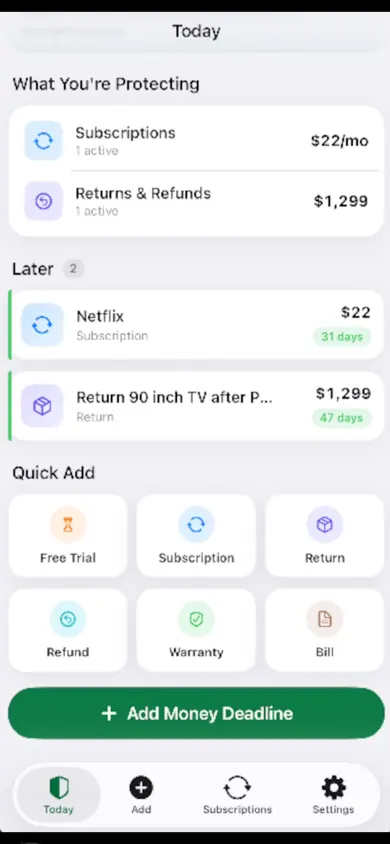
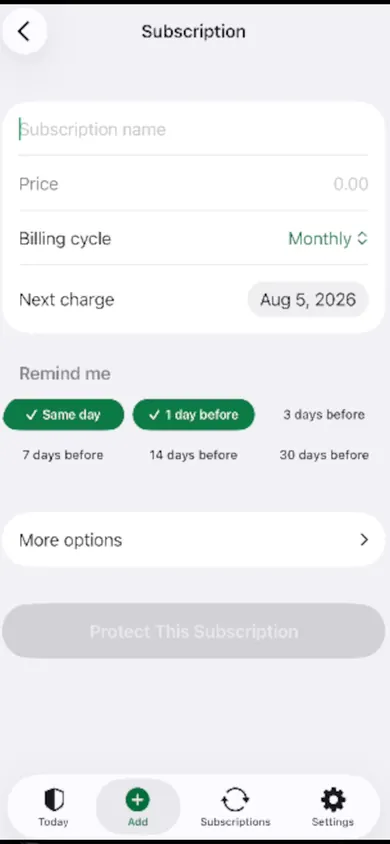
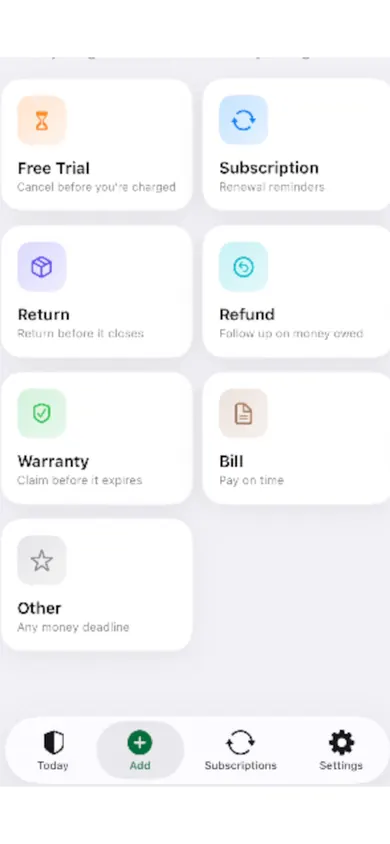
What the app looks like
Bank-linked vs manual: what you trade
Bank-linked (Rocket Money, Hiatus, Feenko)
- Finds recurring charges automatically from your transactions
- Needs your bank login through an aggregator and ongoing access
- Often bundles budgeting, credit scores or bill negotiation
- Paid tiers are typically subscriptions themselves
Manual (MoneyShield, Bobby, Subscription Manager, Subpilot, MonoBoost)
- Nothing leaves your phone; no account to create
- Ten minutes of entry up front, then reminders do the work
- Can track things a bank feed never sees: a 30-day return window, a trial that has not charged yet, a warranty
- Misses anything you forget to enter
A fair summary: bank-linked apps are better at discovery, manual apps are better at privacy and at deadlines that are not yet charges. Pick by which failure annoys you more.
Which kind fits you? Three taps.
Answer honestly; the result is a category, not always our app.
1. How many subscriptions do you think you have?
2. Would you give an app your bank login?
3. What worries you most?
How MoneyShield works, in three steps
Add a money deadline
Choose Subscription, Free Trial, Return, Refund, Warranty or Bill. Enter the name, the amount and the date that matters, and pick reminder days.
See what charges next
The Today screen shows the next 30 days of charges with the days remaining, plus monthly and yearly estimates kept separate by currency.
Decide, then keep the proof
Cancel First ranks what to drop and why. When you cancel, the assistant opens the official route and stores the confirmation number, paid-through date and a screenshot.
Questions people ask before choosing
Do I need to connect my bank to track subscriptions?
No. Manual trackers like MoneyShield, Bobby and Subscription Manager work from what you type in: name, price, billing cycle and next charge date. You trade automatic detection for privacy and no login. Bank-linked apps like Rocket Money, Hiatus and Feenko read your transactions to find recurring charges for you.
Is MoneyShield free?
Yes to download and use. The listing describes a free plan plus an optional Plus tier: $3.99 a month, $24.99 a year or $59.99 once (US prices). New installs start with 7 days of the full feature set, then move to the free plan automatically with nothing billed.
How does a manual tracker catch a renewal I forgot?
You enter the subscription once with its next charge date. The app then reminds you before that date (MoneyShield offers same day, 1, 3, 7, 14 or 30 days before, with 30 days in the Plus tier). The reminder is what catches it, not a bank feed.
Which app actually cancels subscriptions for me?
None of the manual apps cancel anything on your behalf; they point you to the right place. Rocket Money's listing says it can cancel subscriptions for you as part of its service. MoneyShield's Cancellation Assistant shows the official route (Apple subscription settings or the company itself), gives a checklist and request templates, and reminds you to confirm it went through.
Does the FTC click-to-cancel rule protect me now?
Not yet. The FTC finalised a rule in October 2024 requiring cancellation to be as easy as sign-up, but the US Court of Appeals for the Eighth Circuit vacated it in July 2025, days before it was due to take effect. Existing law (ROSCA) still applies, and Apple-billed subscriptions can always be cancelled from iPhone Settings.
Can I track returns, refunds and free trials too?
MoneyShield does: its deadline types are Free Trial, Subscription, Return, Refund, Warranty, Bill and Other, each with its own reminder. Most of the other trackers on this page focus on subscriptions and bills only.
Get MoneyShield free
No account, no bank link, no email scanning. Add your first subscription in under a minute.
Sources
- App Store listings read on 4 November 2026: MoneyShield: Sub Tracker, Bobby, Subscription Manager - Bills, Subpilot, MonoBoost, Rocket Money, Hiatus, Feenko.
- US Court of Appeals for the Eighth Circuit, decision vacating the FTC's Negative Option ("click-to-cancel") rule, 8 July 2025; summary by Kirkland & Ellis.
- Apple Support, how to cancel a subscription from Apple.