How it works, three steps
One tap when something happens
Hot flash, foggy, poor sleep, overwhelmed: one tap saves the moment with its date and time. Add words if you want. Missing days stay unknown, not symptom-free.
Keep the questions
“Can we talk about the night waking?” saved the moment you think of it, not forgotten in the waiting room. “Something changed” marks a shift in a symptom or a treatment your clinician prescribed; later notes never overwrite earlier ones.
Walk in with one page
Pick the main concern, up to three questions and the notes you want to share. Preview, edit, save as PDF, print, or share only when you decide.
Three screens, with the parts that matter marked
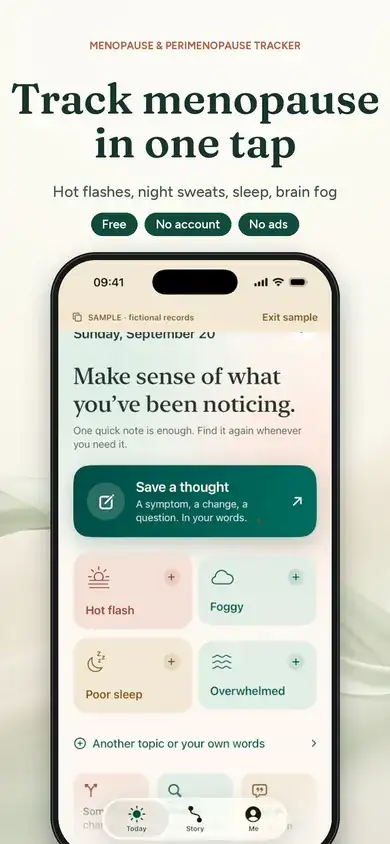 12
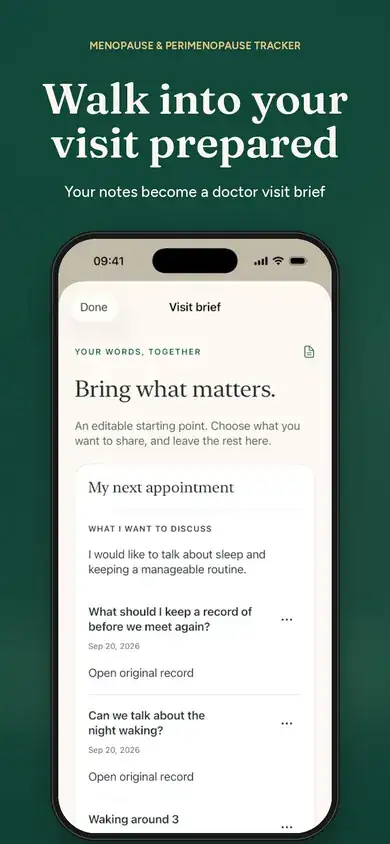 34
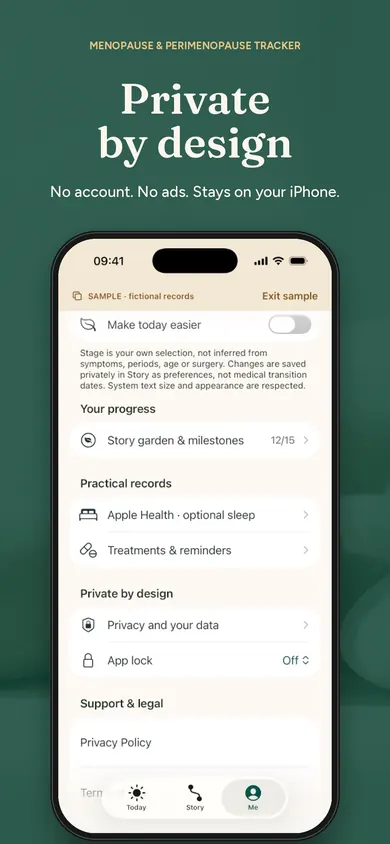 56
Honest limits
Comparisons between periods, grouped Replays, advanced briefs, Playbooks and the Passport are Premium, monthly or annual. The free tier covers the full logging-to-PDF path and your records are never hidden if Premium ends.
Deliberately. The listing says it does not say one thing caused another. If you want an app that tells you oat milk triggers hot flashes, two of the others in the table claim that; we would read those claims carefully.
Balance and Caria have one. Privacy and community pull in opposite directions; this app chose the first.
Released 25 September 2026, rebuilt in 1.1. Few reviews yet.
Questions people ask next
Which menopause tracking app does not need an account?
Of the five compared here, My Midlife Story's listing says no account, no ads, no tracking and no automatic health-data uploads, and Menelle's says privacy-focused with secure local storage. The other three listings describe communities or personalised plans and do not state how data is stored; read their privacy policies before you decide, and treat “listing does not say” as exactly that.
What should I log before a doctor's appointment?
What changed, when, and what you want to ask. You do not need a daily diary: My Midlife Story's own FAQ says save a note only when something is worth remembering, and missing days stay unknown rather than symptom-free. The sample brief above shows the shape: main concern, up to three questions, the notes you choose.
Does the app diagnose perimenopause or recommend HRT?
No. The listing says it organises your own notes and questions and does not diagnose, recommend treatment or doses, or say one thing caused another. That is the right boundary for any tracker; a clinician does the rest.
Is it free?
Logging, history, search, visit briefs, PDF export, reminders, encrypted backup and deletion are free, per the listing, and records are never hidden if Premium ends. Premium is a monthly or annual subscription for comparisons between periods, grouped Replays, advanced briefs, Playbooks, a yearly Passport and garden looks.
Is there anything for the days when even one tap is too much?
Low-Capacity mode: larger, calmer controls, one main action at a time, motion and sounds turned down. It works with VoiceOver, Dynamic Type and Reduce Motion, per the listing.
Why a garden?
Because streaks are the wrong motivation for symptoms. The listing says points never depend on symptoms or how you feel, a break never removes progress, and blooms never wilt. The garden grows from notes saved, not from having a bad night.
Five menopause trackers, from their listings, 4 November 2026
| App | Account | Where the data lives (per listing) | Doctor report | Cost | Age · iOS |
|---|---|---|---|---|---|
| My Midlife Story: MenopauseHonest Little Apps · ours | No account | Records stay on the device; no automatic health-data uploads; password-encrypted backup you keep; Apple Health sleep context off until you turn it on | One-page visit brief you edit, save as PDF, print or share; every line links to the original note | Free: logging, history, search, visit briefs, PDF export, reminders, backup. Premium subscription for comparisons, Replays, Playbooks, Passport | 12+ · iOS 18 |
| Balance - Menopause & HormonesBalance App Limited | listing does not say | Has a community and community experiments; see its privacy policy for storage | Health Report to take to your next appointment, free per listing | Free core; balance+ optional premium subscription | 17+ · iOS 15.1 |
| Caria: Menopause & MidlifeApexHealth | listing does not say | Community features and personalised insights; see its privacy policy | listing does not say | Free download; Premium $49.99/year or $9.99/month per listing | 12+ · iOS 15.1 |
| Health & Her AppHealth & Her Ltd | listing does not say | Personalised experience and custom plans; see its privacy policy | listing does not say | Free download; purchases listing does not say | 17+ · iOS 15.5 |
| Perimenopause Tracker: MenelleTen Labs | listing does not say | Privacy-focused with secure local storage, per listing; meal scanning for triggers | Doctor-ready PDF health reports, per listing | Free daily tracking and 7-day insights; Pro for more | 4+ · iOS 18 |
“Listing does not say” is not a mark against an app; it means the App Store description does not state it, so check the privacy policy and the first screen after install. Star ratings are left out; ours is weeks old and has almost none.
Free on iPhone
My Midlife Story: Menopause. One-tap symptom notes, your questions kept, a one-page visit brief you edit and share only when you decide. No account, no ads, records on your phone.
Sources
- US App Store listings read 4 November 2026: My Midlife Story: Menopause, Balance - Menopause & Hormones, Caria: Menopause & Midlife, Health & Her App, Perimenopause Tracker: Menelle. Account, storage, report and pricing statements are quoted or paraphrased from those pages; we did not test every app in depth.
General information only. Nothing here diagnoses, recommends treatment or replaces a conversation with a qualified healthcare professional. The sample brief above is a demonstration and stores nothing.