Holiday rush 2026 · a 14-day plan · updated November 2026

Stop replying at 11 pm. Start booking in one tap.

Salon holiday booking is the same December problem every year: more requests, less time, and every one of them typed by thumb between clients. Three sliders total what it costs you. Then a 14-day plan to be ready before the rush, with BookingSolved, our app, or without it.

Three questions · the December reply bill
14
4
3
—hours of replying in December (26 working days)
—client appointments that time equals, at 45 min each
—late-night replies, if a third land after close

Arithmetic on your sliders. BookingSolved reads the message you paste, checks Apple Calendar and drafts the reply; you still read it and tap send, so count on it removing the calendar-checking and typing, not the deciding.

Download BookingSolved: Client Booking on the App StoreStart on your iPhone · first 3 actions free

How it works, three steps

1

Share the message

Paste the text, choose a screenshot, or use the Share Sheet from Messages or Instagram. Only what you choose is read.

2

Review what it found

Service, date, time, duration, found on your iPhone. Unclear dates like “next Friday” are flagged, not guessed. Approve, and it checks Apple Calendar and prepares the appointment.

3

Copy the reply, send it yourself

An editable confirmation in Friendly, Professional or Concise. For “when are you free?” you get open times around existing bookings and buffers.

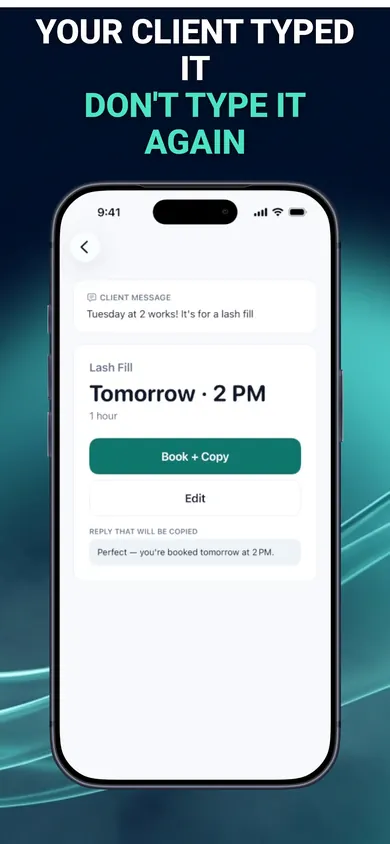
BookingSolved: client message Tuesday at 2 works, it's for a lash fill, turned into a proposed Lash Fill appointment tomorrow at 2 PM with Book + Copy and a ready reply
The client typed it; you do not type it again.
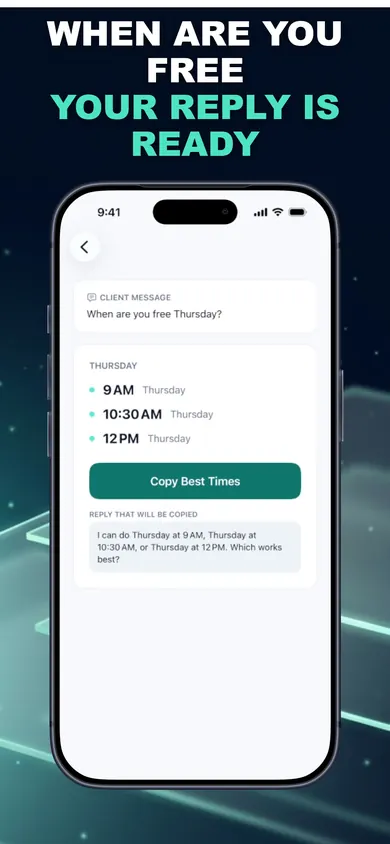
BookingSolved: client asks when are you free Thursday; the app lists 9 AM, 10:30 AM and 12 PM with a Copy Best Times button and a drafted reply
Open times around your bookings and buffers.
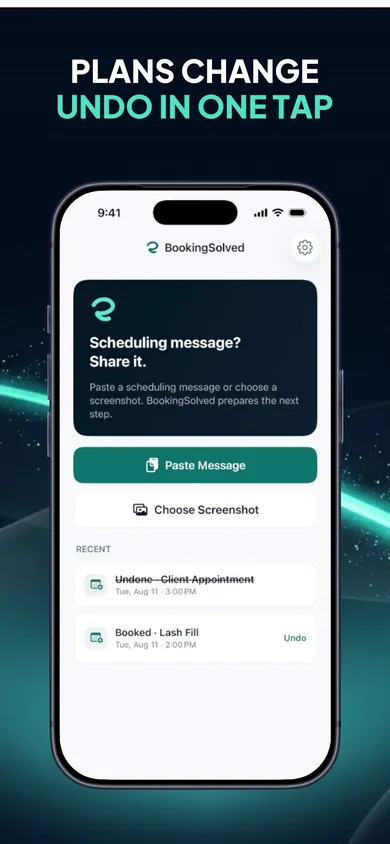
BookingSolved home: paste message or choose screenshot, with recent actions including a booked Lash Fill and an undone client appointment
Undo in one tap, and it checks nothing changed first.

The 14-day plan, before the rush

  • Day 1
    List every service with its real duration and buffer.Use the salon or barber preset, then fix the numbers you know are wrong.
  • Day 2
    Set business hours for December, including the Sundays you are opening.Open-time suggestions only work inside these.
  • Day 3
    Move every booking you have into Apple Calendar.Paper, a second app, your head: if it is not in Calendar it does not exist to the tool.
  • Day 4
    Try the sample message in the app, then one real old text.First 3 completed actions are free.
  • Day 5
    Pick your reply tone and keep it: Friendly, Professional or Concise.Edit the draft once so it sounds like you; it stays editable.
  • Day 6
    Write your “which works best?” question for incomplete messages.The app offers one; make it yours.
  • Day 7
    Decide a reply window and say it in your bio: “I confirm bookings between 9 and 7.”The app does not reply for you; the window is what ends the 11 pm habit.
  • Day 8
    Add travel or prep buffers to the services that always run over.Buffers are what stop December from stacking.
  • Day 9
    Practise a reschedule: “can we move it an hour later?” on a test event.Before-and-after preview; moves only on approval.
  • Day 10
    Practise a cancellation and the Undo.Undo refuses to overwrite anything changed in Calendar.
  • Day 11
    Block your own breaks and the school run in Calendar as events.Open-time suggestions route around them.
  • Day 12
    Decide whether Pro is worth it, using the slider number above.Unlimited bookings, reschedules, cancellations; monthly or yearly; price shown in the app.
  • Day 13
    Tell regulars how to book: text the service and two times that suit.Complete messages mean no question back.
  • Day 14
    Rush opens. Reply inside your window, from the app, in one tap.Then put the phone down at 7.

Honest limits

Pro is a subscription.

After 3 free completed actions, bookings, reschedules and cancellations need Pro, monthly or yearly. Undo stays free. If December brings you 300 requests, that is the maths to do on day 12.

You still send.

Nothing goes out without your thumb. If you wanted a bot that answers clients at midnight, this is deliberately not that.

Apple Calendar only.

No Google Calendar, no Square, no Fresha. If your bookings live elsewhere, this is the wrong tool until they live in Apple Calendar.

No prices, no payments, no reminders to clients.

It books and replies. Deposits, no-show fees and client reminders are not in the listing.

Saturday 12 December, made up but familiar

7:40 amEleven messages overnight. Before, this was twenty minutes on the sofa with the calendar app open in another window. Now: share each one, read what it found, tap Book + Copy, paste, send. Four say “when are you free?” and get three open times each, around the buffers you set on day 8.

2:15 pmBetween a balayage and a cut: “can we move mine to 5?” Before-and-after preview. Approve. Reply copied. Thirty seconds, no double booking, because Calendar is the only truth.

7:02 pmPhone face down. One message arrives at 10:50 pm: “next friday?”. In the morning the app flags the date instead of guessing, and the question it drafts is the one you wrote on day 6.

Questions from the chair

Does BookingSolved reply to my clients for me?

No. The listing is clear: you send every reply yourself, and it never contacts clients or reads conversations in the background. It reads only the message you paste or share, prepares the booking against your Apple Calendar, and drafts a reply in Friendly, Professional or Concise tone for you to copy.

Do my clients have to use a new portal or link?

No. The listing says no new booking portal and no connected inbox; clients keep texting or messaging you the way they already do. That is the whole point for a salon that lives on Instagram DMs and texts.

What happens with “next Friday” or “4/5”?

Flagged, not guessed, per the release notes. You get an editable question to send back instead of a wrong booking.

Can it double-book me during the rush?

It checks your Calendar, re-checks right before saving, blocks a double tap from creating a duplicate, and uses each service’s duration and buffer to suggest open times. It will not know about appointments that are not in Apple Calendar, so that has to be your single source of truth.

What does it cost?

Your first 3 completed actions are free. Pro is a monthly or yearly auto-renewing subscription for unlimited bookings, reschedules and cancellations; the price shows in the app before you buy. Undo is always free.

Is my client data uploaded?

Requests and screenshots are processed on the device and not uploaded, per the listing; there is no account. Apple and RevenueCat get an anonymous ID and purchase status, never messages or Calendar data.

Start on your iPhone

BookingSolved: Client Booking. Paste the request, approve the appointment, copy the reply. No portal, no connected inbox, on-device. First 3 actions free; Undo always free.

Download BookingSolved: Client Booking on the App StoreiPhone and iPad · iOS 18

Sources

  1. BookingSolved: Client Booking on the App Store, listing and release notes read 4 November 2026 (version 1.1.0): workflow, open-time suggestions, reschedule and undo behaviour, presets, privacy, free actions and Pro.

The reply-bill calculator is arithmetic on numbers you set; it makes no claim about your bookings or income. General information for small businesses, not accounting or legal advice.